Flat Earth Sun & Moon Clock
Blue Water BayEducation
4.41.82K Reviews
- Version
- 5.11.103
- Installs
- 50.00K
- Age Rating
- Everyone
Screenshots



Our Review of Flat Earth Sun & Moon Clock
 Analysis by Appyee
I found Flat Earth Sun & Moon Clock most useful as a visual conversation piece: it presents the motion of the sun and moon through a flat-Earth lens, rather than serving as a conventional astronomy or timekeeping tool. That distinction matters before you install it. If you want to explore how this particular model describes day and night, the moving display gives you something concrete to examine; if you need dependable, evidence-based sky predictions, I’d choose a standard astronomy app instead.
Where the experience can get confusing
The central idea is easy to grasp, but it can also lead to a mismatch of expectations. The display is a model, not a neutral demonstration of how the sky works, and its educational material is framed around Flat Earth theories. I’d approach it as an invitation to inspect a claim, not as a substitute for a science reference. Keeping that distinction in mind makes the app more useful and avoids treating a striking animation as proof.
There is also a difference between watching a simulation and using a clock for practical planning. A visual cycle can help make the app’s concept easier to follow, but it should not be your only guide for deciding when to travel, photograph a sunset, or plan an outdoor activity. For those jobs, I would compare with a conventional local forecast or astronomy tool that is intended to provide practical sky information.
Simple checks before you settle in
When I try an unfamiliar educational app, I first give the main display a moment to load, then explore one control at a time. That’s a sensible way to approach this clock too: start with the moving sun-and-moon view, notice what the controls change, and only then move on to the reading material. If something seems confusing, returning to the main display can help separate the basic model from the extra explanations.
The app is listed for iOS 9 or later, so checking your device’s operating-system version before paying is worthwhile. It costs $2.99, and in-app purchases range from $0.99 to $10.99 per item. I’d review the purchase prompts carefully and decide whether the central visualization alone is enough for you before spending more. The app is rated Everyone, but its subject matter may still be best discussed with younger users as an example of how to evaluate competing claims.
Picking up again if the flow breaks
If you lose your place while browsing, I’d return to the clock face and use it as an anchor: first identify what the moving display is showing, then reopen the educational material you meant to explore. This simple reset is more helpful than trying to remember every detail from a long session. It also makes the app easier to show someone else, since you can begin with the visual idea and add context as questions come up.
For a smoother visit, keep the session focused. Watch one cycle, choose one point from the accompanying material, and talk through what the model is claiming. That approach turns a potentially sprawling topic into a manageable comparison. It is especially useful in a classroom or casual discussion, where the goal is to examine an argument rather than absorb a large amount of material at once.
When another tool is the better choice
The developer, Blue Water Bay, describes this as a way to follow the sun and moon around an Earth circle, and the app’s identity is firmly tied to that specific viewpoint. That makes it more specialized than general educational astronomy apps, which usually focus on conventional explanations and practical sky information. I’d pick this one for seeing how the flat-map model is presented; I’d pick a mainstream astronomy reference for checking what to expect in the real sky.
It is also not a fit for everyone who enjoys looking at the moon or learning about space. If you want verified astronomical facts, straightforward stargazing guidance, or a neutral comparison of scientific models, the app’s perspective may feel too narrow. In that case, use an established science resource alongside it, or skip it altogether. Its value is strongest when you are curious about the model itself and willing to keep claims separate from evidence.
Who is likely to enjoy it?
I can see this being useful for a curious adult, a discussion group, or a teacher who wants a visual prompt for media literacy. For example, you might open it at home, watch the sun and moon move around the map, and ask a teenager what the animation appears to claim before comparing that claim with a conventional astronomy source. The important part is the conversation and comparison, not presenting the app as an authoritative lesson in astronomy.
By contrast, someone looking for a daily planner, an accurate local sunrise reference, or a broad introduction to space will probably be happier elsewhere. The clock’s unusual premise is its main draw, but it is also its main limitation: if that premise does not interest you, the rest of the experience may not offer enough reason to keep returning.
What the app is like in context
Flat Earth Sun & Moon Clock is an Education app from Blue Water Bay. It has a 4.4 average from around 4,900 ratings, with about 1,800 written reviews and over 50,000 installs. It was released on December 27, 2018, and its current version is 5.11.103. Those details suggest an established niche audience, though popularity alone does not tell you whether its claims are scientifically sound or whether its approach will suit your needs.
Compared with a standard planetarium-style app, this one is less about identifying celestial objects or supporting an evening of stargazing and more about presenting a distinctive model. That difference makes it a poor one-app solution for general astronomy, but a more direct choice if your specific question is how the flat-Earth account visualizes the sun and moon. I would use it alongside, not instead of, a conventional reference when accuracy matters.
A practical way to decide
Before installing, ask yourself what you want from it: a visual object to discuss, a look at an alternative explanation, or a reliable tool for everyday sky planning. It serves the first two purposes more naturally than the third. If you are unsure, keep your first session short and judge whether the moving map and accompanying educational material give you something worth exploring. The Everyone age rating makes the app broadly accessible, but a parent or educator should still provide context about evaluating claims.
If a screen behaves unexpectedly, I’d start with ordinary checks rather than assume the model itself has changed: close and reopen the app, confirm the device meets the listed iOS requirement, and make sure you can return to the main clock view. If the issue persists, checking for an available app update is a reasonable next step. These are general troubleshooting steps, not a guarantee that every problem will be resolved, but they help rule out a temporary interruption before you abandon a session.
What’s the Deal with Flat Earth Sun & Moon Clock?
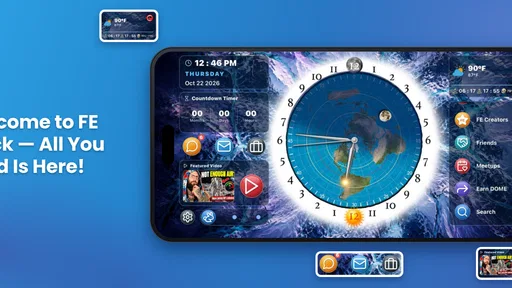
First things first, let’s chat about what this app is all about. Imagine having a clock that not only tells you the time but also shows you the movement of the sun and moon around a flat earth model. Sounds intriguing, right? The Flat Earth Sun & Moon Clock app is designed to give users a visual representation of how the sun and moon would allegedly move over a flat earth.
When you fire up the app, you’re greeted with a clock face that’s superimposed over a flat earth map. As you watch, the sun and moon glide gracefully around the clock, simulating day and night cycles. It’s quite a captivating sight, and even if you’re a skeptic, there’s no denying it’s fascinating to watch.
Features That Keep You Hooked
Let’s dive into some of the app’s features. The app’s interface is pretty straightforward, which is great because nobody wants to fumble around with complicated settings when they’re just trying to see the sun and moon do their thing.
One of the standout features is the real-time simulation of the sun and moon positions. It’s almost hypnotic to watch, and it can give you a whole new perspective on time. Plus, there are additional settings where you can adjust the speed of the simulation. So, if you want to see a month’s worth of sun and moon movements in a minute, you’ve got it.
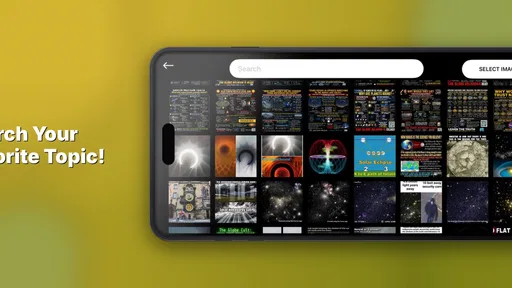
The app also includes a range of educational resources. These are aimed at offering users more insight into Flat Earth theories. Whether you’re a believer or just curious, these resources provide some food for thought and can be quite engaging.
Getting the Most Out of the Experience
Now, if you’re really keen on exploring this app, I’d recommend diving into the various educational videos and articles it offers. It’s like getting a crash course on Flat Earth theories without having to scour the internet. The app creators have clearly put a lot of effort into compiling these resources, and it shows.
As you explore these resources, you might find yourself questioning everything you thought you knew about the world. Or, you might simply enjoy the unique perspective it offers. Either way, it’s an experience worth having, especially if you’re into unconventional theories.
Wrapping It Up
So, what’s the final verdict on the Flat Earth Sun & Moon Clock app? While it may not convert everyone into a Flat Earther, it definitely provides an interesting way to view our world. The app’s intriguing visuals and comprehensive resources make it a fun tool for anyone interested in exploring alternative perspectives.
Whether you’re a die-hard believer or just someone who loves a good conspiracy theory, this app is worth checking out. It’s a unique blend of education and entertainment that’s bound to spark some interesting conversations. And hey, even if you’re not convinced by the Flat Earth theory, it’s still pretty cool to watch the sun and moon dance around a flat map!
My practical verdict
My recommendation is to treat it as a niche visual explainer, not as a dependable clock or a replacement for astronomy education. Its appeal is easy to understand: the moving map gives the subject a memorable shape, and the adjustable pace can make it easier to pause and discuss what the model is proposing. The trade-off is that a compelling animation can feel more convincing than the evidence behind it, so I would pair curiosity with careful checking.
For a first visit, I’d watch the display at its normal pace, then slow the simulation enough to follow the movement without rushing. After that, try a faster setting only if you want to see the cycle as a whole. This small change in approach helps distinguish the individual motion from the overall pattern, and it gives you a better basis for asking questions about what the app presents rather than simply watching it pass by.
Ultimately, I’d recommend it to people who are specifically interested in how a flat-Earth account depicts the sun and moon, or who want a starting point for a thoughtful discussion about claims and evidence. I would steer anyone seeking practical sky guidance or a balanced science course toward a conventional astronomy resource. The app is an unusual, focused experience; whether that focus is a strength or a drawback depends entirely on what you hope to learn.
Verdict
Strengths of Flat Earth Sun & Moon Clock
- Visually appealing and intuitive interface.
- Accurate sun and moon data tracking.
- Customizable alerts for key events.
- Engaging educational content included.
- Offline access to key features.
Limitations of Flat Earth Sun & Moon Clock
- Limited features in the free version.
- Occasional glitches when updating data.
- Requires in-app purchases for full access.
- Content may not suit all audiences.
- Heavy on battery usage during updates.
Similar Picks in This Category
View All
Duolingo: Language Lessons
Duolingo4.7

Google Classroom
Google LLC2.8

Unacademy: Learn & Crack Exams
Unacademy3.2

Bible App for Kids
Life.Church4.4

Cake - Learn English & Korean
Cake Corp.4.7

Brainly: AI Homework Helper
Brainly4.5
Frequently Asked Questions
What is the main purpose of the Flat Earth Sun & Moon Clock app?
The Flat Earth Sun & Moon Clock app is designed to present users with a unique perspective on timekeeping by illustrating the positions of the sun and moon over a flat earth model. It aims to challenge conventional globe-based time concepts and provides a visual representation aligned with flat earth theories.
How does the app display time differently from standard clocks?
Unlike standard clocks that use a circular face to represent a 24-hour day divided into two 12-hour segments, this app uses a flat earth map to show the sun and moon's positions. The app visually demonstrates how day and night cycles work on a flat earth model, offering an alternative explanation to traditional geocentric views.
Are there any educational features included in the app?
Yes, the app includes educational features such as videos and articles that explore flat earth theories and concepts. It also provides interactive elements that allow users to experiment with different time zones and observe how they correlate with the sun and moon's positions across the flat earth map.
Is the Flat Earth Sun & Moon Clock app free to download?
The app offers a free version with basic features, but to access advanced functionalities and additional content, users may need to purchase a premium version. The premium version typically includes features like ad-free usage, extended articles, and exclusive educational videos.
What devices are compatible with the Flat Earth Sun & Moon Clock app?
The app is available for both Android and iOS devices. It's compatible with most modern smartphones and tablets, requiring an updated operating system to ensure optimal performance. Users are encouraged to check the app store for specific compatibility details before downloading.
